
Building a WordPress site from scratch eats weeks. Picking fonts, aligning columns, designing a header that does not look like every other header on the internet.
Most people never finish. The ones who do usually wish they had started with a ready-made template.
That is what Elementor template kits are for. You install a kit, it drops in finished pages and a global style, and you spend your time on copy and images instead of pixel-pushing. The catch: most addons plugins either lock template kits behind their highest tier, or ship a tiny library that all looks the same.
Master Addons for Elementor is the exception. It ships a growing library of free, pre-built template kits inside the plugin itself, plus a separate importer that handles third-party kits from marketplaces like Envato Elements.
You can grab the plugin straight from the official WordPress.org plugin page. At the time of writing it sits at 30,000+ active installs, a 4.5-star average rating, and 200+ verified reviews.
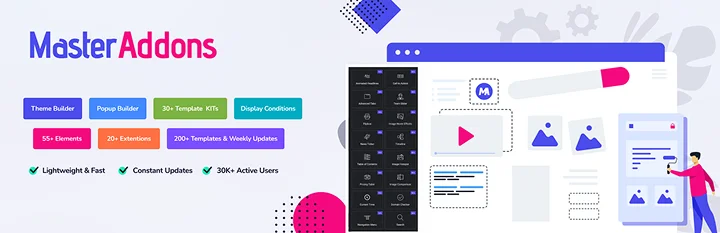
This post walks through why template kits matter, how the Master Addons kit library works, what the Template Kit Importer adds on top, and the rest of the toolset you get once the plugin is on your site.
Why Free Elementor Template Kits Matter
A template kit is more than a single page. A real kit gives you a coordinated set of pages (home, about, services, contact, blog) that share the same typography, colors, spacing, and component styles. Drop one in and your whole site already looks designed.
That matters for a few groups of people:
- New site owners who do not have a designer and need a site online this week.
- Freelancers and agencies who want to deliver client sites in days, not months.
- Bloggers and small business owners who would rather write content than fight with a page builder.
The cheapest, fastest path is a free template kit that lives inside an addon you were going to install anyway. No second subscription, no marketplace account, no manual JSON imports.
Master Addons Template Kit Library: 30+ Ready-Made Kits
The Master Addons template kit library currently ships with 30+ full website kits. The categories cover what most small sites and agencies actually need: digital agency, SaaS landing, restaurant, gym and fitness, education, portfolio, photography, e-commerce store, consulting, medical, real estate, travel, and more. New kits get added with most major releases.
Every kit includes:
- A homepage built around a clear conversion path
- Inner pages: about, services, pricing, contact, single blog
- Matching header and footer designs
- Global styles for color palette and typography
- Reusable sections you can drop into other pages
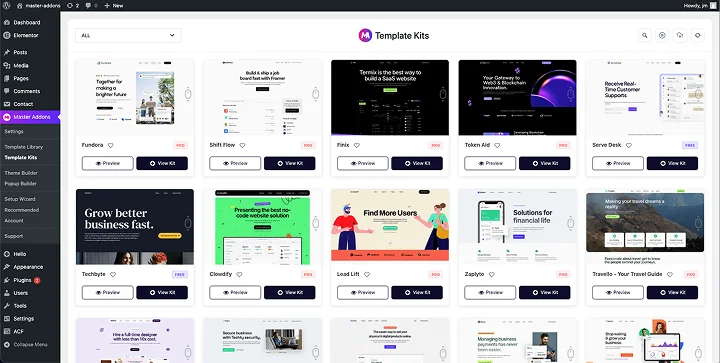
You access the library from your WordPress dashboard at Master Addons → Template Kit. The screen shows every available kit with a live preview. You pick one, click Import All Templates, and the plugin pulls in every page, header, footer, and section in a few seconds.
Need just the homepage from one kit and the pricing page from another? Click into the kit, browse individual pages, and import only what you want. Full walkthrough is in the access and import pre-built template kits documentation.
One detail worth knowing: when a kit needs an extra plugin (Contact Form 7, for example), Master Addons surfaces a one-click Install Requirements button so you do not have to hunt for dependencies.
After import, your imported pages show up under Pages, and saved sections live under Elementor’s saved templates. Header and footer designs get assigned through the Theme Builder, which we cover further down.
The Template Kit Importer: Bring Your Own Kits
The kit library is great, but the moment you start working with clients you will want to use kits from outside the plugin too. Envato Elements alone has thousands of Elementor template kits, and most of them ship as a .zip file with a JSON pack and an asset folder. Importing those by hand is the kind of job nobody enjoys twice.
Master Addons solves this with the Template Kit Importer. Instead of hand-importing each JSON, copying images into the media library, and reattaching them one by one, you upload the entire .zip and the plugin handles the rest.
The flow looks like this:
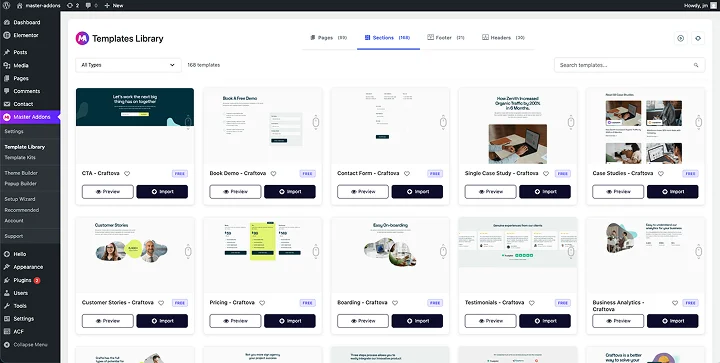
- Go to Master Addons → Template Library and click the cloud upload icon.
- Drag the .zip kit file you downloaded from Envato Elements (or any compatible source).
- Master Addons reads the kit manifest, lists required plugins, and offers to install and activate them.
- Pick whether you want the full kit or just specific templates.
- Click import. Pages, sections, media, typography, and color tokens land in the right places automatically.
What gets imported:
- All design templates (headers, footers, homepages, single pages, sections)
- Media assets, copied straight into your WordPress Media Library
- Global styles for typography and colors
- Fully wired-up pages, ready for content swap
If you have ever wasted an evening manually wiring a marketplace kit into a fresh install, this feature alone pays for the time you save on your first project. Watch out for one thing: kits sometimes reference plugins you do not have installed, so let the dependency check finish before you panic about missing widgets.
What You Get Beyond Template Kits
Template kits are the headline reason to install Master Addons, but they sit on top of a much bigger toolset. Once the plugin is active you also get:
Rich Template Library
Separate from the full kits, the Template Library is a growing collection of individual pages, sections, headers, footers, and popups you can import one at a time. Useful when you already have a design and just need one new section, like a pricing block or a team grid, without reworking the whole site.
Popup Builder
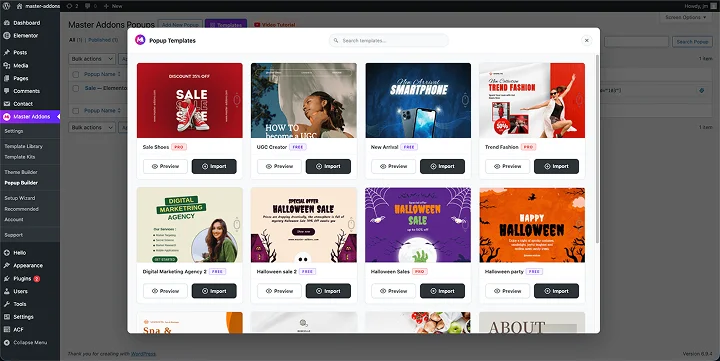
The built-in Popup Builder lets you design popups inside Elementor itself, then trigger them on exit intent, scroll percentage, time on page, page load, or after a stretch of inactivity. You can target popups to specific pages, post types, devices, or logged-in states. Popups are how most sites push email signups and lead magnets, so having this baked in saves another monthly subscription.
Theme Builder
The Theme Builder gives you control of the parts most themes lock down: site headers, footers, blog archives, single post templates, 404 pages, and comment forms. Build them in Elementor, set display rules (entire site, only blog posts, only WooCommerce categories, and so on), and they take over from your theme’s defaults.
80+ Widgets and Extensions
On top of all that, Master Addons ships 80+ widgets and extensions for the Elementor editor. The widget set covers what most sites actually need: animated headlines, pricing tables, image comparisons, filterable galleries, mega menu navigation, accordions, tabs, countdown timers, team carousels, image hotspots, and more.
The extensions add visual effects (glassmorphism, particles, parallax, floating effects), display conditions, custom breakpoints, tooltips, and per-element custom CSS.
So once you install Master Addons for the template kits, you stop needing four other addon plugins for the rest of the build.
Who Should Install Master Addons
If you fall into any of these buckets, the plugin earns its place:
- You are launching a fresh WordPress site and want a finished design in an afternoon.
- You build sites for clients and want to cut delivery time on every project.
- You buy template kits from Envato or other marketplaces and are tired of manual imports.
- You currently run two or three Elementor addons and want to consolidate.
- You need a header, footer, and popup builder without buying separate plugins for each.
It also slots in nicely next to other parts of a typical WordPress stack. If you run a course site, see this roundup of the best WordPress LMS plugins. Master Addons builds the marketing pages around the LMS. Running a paid community? Pair it with one of the best WordPress membership plugins for gating. And every site eventually needs social media plugins on top of a clean design.
How to Install Master Addons and Import Your First Kit
The fastest path from zero to a finished homepage:
- From your WordPress dashboard go to Plugins → Add New, search for Master Addons for Elementor, install, and activate. Or download the latest version directly from the WordPress.org plugin page.
- Open Master Addons → Template Kit.
- Browse the 30+ kits, preview the ones in your niche, and click into the one you want.
- Click Install Requirements if prompted, then Import All Templates.
- Open Pages, set the imported homepage as your front page under Settings → Reading, and start swapping in your real content.
- For header and footer, open Master Addons → Theme Builder and assign the imported header and footer templates site-wide.
If you are bringing in a kit you bought elsewhere, swap step 2 for the Template Library upload icon, drop your .zip, and follow the same flow. Most kits import in under a minute, though larger ones with a lot of media can take a bit longer on cheap shared hosting.
Wrapping Up
If your goal is to launch a finished WordPress site this week instead of next month, a template kit is the shortcut. And if you want both a free in-plugin library and a way to bring in marketplace kits without manual JSON wrangling, Master Addons is built around that exact workflow.
Grab it from the WordPress.org plugin page, or read more about every feature on the Master Addons website. Then open the Template Kit screen and pick the design that fits your project.
You may also like :
- 6 Best Branding FAQs to Consider About Branding in 2026
- Ultimate Guide to Technical SEO Auditing in 2026
- Top Social Media Platforms for WordPress Website 2026
Frequently Asked Questions
Are the Master Addons template kits really free?
Yes. The 30+ kits in the built-in library come with the free version of Master Addons. Some individual templates and a handful of advanced widgets need the Pro version, but you can build a full site from the free kits without paying.
Can I use Master Addons template kits on client sites?
Yes. There is no restriction on commercial or client use of the kits. Agencies and freelancers regularly use the library as the starting point for paid client builds.
Will template kits work with my existing theme?
The kits are theme-agnostic and work with any Elementor-compatible theme. For the cleanest result, pair them with a lightweight theme like Hello Elementor or GeneratePress so the kit’s design system controls the look without theme styles fighting it.
Do I need to know any code to use the template kits?
No. The whole point of the kit library is that you import a finished design, edit text and images visually inside Elementor, and publish. No PHP, no CSS required for a standard build.